News

Select different option instead of SMS for Multi-Factor Authentication

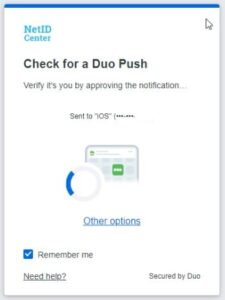
If you use SMS passcodes when signing in to university resources with Duo, you will need to select a different option.  

SMS passcodes are the least secure option when using Multi-Factor Authentication and the university is removing the SMS (text) option for the Illinois campus beginning July 14 to help better protect university resources from cyber criminals. MFA also helps protect personal information, such as access to direct deposit. 

Jump to a tutorial video.

What you need to do: 

Determine whether you will use the Duo mobile app on a tablet or smartphone or use a token (key) that you plug in to your PC or laptop.

  • If you select the Duo app option, download it and install it on your smartphone or tablet.
What is looks like to choose the Duo Mobile app in your app store.
  • If you select the token, you can obtain one from the WebStoreActive faculty and staff should first reach out to their college or unit IT support staff to determine whether their department has specific instructions for acquiring a token. 

Once you have the token in hand or have the app installed you can change your second factor as registered in the NetID Center to your new option.  

  1. Visit the NetID Center and select manage my 2FA. 
  2. Follow the instructions in this Answers KnowledgeBase article to make a new selection.  

Video instruction

FAQ

This FAQ answers more questions about discontinuing SMS passcodes.

Your cybersecurity training – More relevant, more features, more accessible

Faculty and staff cybersecurity training is getting a makeover and moving to a new platform starting with the July 2025 quarterly training. 

In collaboration with the Center for Innovation in Teaching and Learning, we have created new required and optional modules that will be presented using eText, which delivers materials with multimedia, notes and assignments embedded directly in context. 

What will be new? 

“Having an in-house training platform lets us tailor our training to be relevant to the university rather than relying on more general content,” explained lead cybersecurity training specialist Cindy McKendall. “We can customize and show real world examples such as ransomware lock screens or phishing messages.”

Taking training via eText is convenient. You can install the eText app on your desktop or smart phone or use a browser.

What will remain the same? 

The training team will continue to develop modules based on user feedback. “We collect feedback each year and use it to improve what we present to campus,” McKendall said.  She added that staff and faculty will continue to receive quarterly email reminders containing a link to the Training platform (now eText) where you will sign in using your university login and password.  Training will still be easy to complete, usually taking less than 15 minutes.  

Find out more about cybersecurity training and get additional tips at cybersecurity.illinois.edu.

Cybersecurity Improvement Initiative comes with benefits for university, colleges and units

The Office of the CIO is steering a university wide effort to improve cybersecurity on all university owned devices. With support from the provost and backing of deans and unit leaders, the Cybersecurity Improvement Initiative has rolled out. First on the agenda is using industry-leading software to understand when there is suspicious activity on university networks that might be the marker of impending cyberattacks.

“The staff who work as the first line of defense against cyberattacks have great tools at their disposal so that we can do more prevention rather than reaction,” noted Sandra Thompson, associate director of cybersecurity program administration in Technology Services. Endpoint management and cybersecurity professionals are collaborating to bring these tools online all over campus. With them we have visibility into the state and nature of the systems on our network, better vulnerability management through prompt updates and robust protection against ransomware, malware and other attacks that can lead to costly and time-consuming data loss. We expect that it will also streamline required auditing,” she said.

CII phase one deploys two separate but interconnected things: endpoint management software and CrowdStrike software. Endpoint management allows IT staff to remotely manage some day-to-day operations needed for your computer’s overall health, such as batching patches or updates to university devices, rather than visiting each individual computer. Once a device has endpoint management installed, CrowdStrike offers threat detection and mitigation.

Think of it like the notification on your home security system. You can sign up to get notice if the camera sees something. Then you can turn on the camera remotely and determine whether what you see is a squirrel or someone stealing a package off your porch. It works with that same concept in mind. Frontline staff-such as your unit IT professional and staff in the Cybersecurity Operations Center-get notified if something is out of the ordinary. They can then investigate whether what is happening is a threat.

There are many ways that cyber criminals try to steal credentials and personal and university data. When the university can head those off, we protect time, resources and the university’s reputation.

IT specialist Damian Behymer with Library IT has been working to deploy both on all library devices. “CrowdStrike uses machine learning and expertise from security researchers to detect when there are signs of cyberattack. It goes beyond anti-virus software; CrowdStrike can notice unusual behaviors and processes on the university network that can be signs of compromise,” they said. 

Both the College of Education and University Library have completed the phase one work, meaning they reached a critical mass of devices with endpoint management and CrowdStrike successfully installed.

Increasingly universities need to be able to show that they are protecting interests and wellbeing of stakeholders with modern security measures. What we have to defend ourselves from is so much more complex than even 10 years ago, Behymer explained. “Cyberattacks-financial or seeking research data-are increasingly common and threatening. To get grants, we need to demonstrate due diligence and that we take common sense measures to protect data and systems with detection and response software installed broadly.”

The risk of a breach or ransomware falls on each unit or college. Individual IT groups take responsibility for doing security well, they added.

The Library has had CrowdStrike installed since it was available, according to director of library technology Tracy Tolliver. “Because of a previous well-known incident at a British library with a ransomware attack, we did not have to try hard to relate the importance of this because they had seen in that example what can happen if we do not try and secure our systems, monitor them and react quickly.”

Completing the first phase meant collaborating closely with individuals they support. Behymer discovered a handful of devices that needed maintenance to repair a connection with CrowdStrike or devices with operating systems so old they could not install CrowdStrike. “In many cases those devices were for very specific tasks. This meant strengthening relationships with experts and what people did with those computers, and finding out how IT can upgrade or replace the computer so they can still do what they need to do,” they added.

Sergio Correa, IT solutions architecture associate, has been the lead IT staff member for CII in the College of Education. He pointed out that installing endpoint management and CrowdStrike has led to having accurate lists of devices. This will be beneficial as campus moves to modern management tools.

“We also refined our departmental policy for supporting old devices. We found devices that did not support Windows 11 or latest macOS. It made us discuss the topic and come to a conclusion that we feel good about,” he said.

And while Correa was the main person managing the cleanup and installation during the large undertaking, he said he was able to communicate with coworkers about the steps involved in endpoint management, which creates a beneficial redundancy of knowledge and skills.

The College of Education and Library now are well positioned to continue to update devices with needed protections. A dozen more colleges and units are currently undertaking this same work, and eventually the entire campus will undergo the process.

“I am happy to see that campus is devoting resources to this and we had the support we need to implement these cybersecurity measures. The process has gone as smoothly as possible, being that we are one of the first two units to go,” Tolliver said.

Privacy Everywhere Conference: Pioneering Human Centered Data Practices in Higher Education

The Privacy Everywhere Conference, held at the University of Illinois Urbana-Champaign, brought together experts to discuss the critical issue of data privacy. The conference explored a human-centered approach to privacy, balancing innovation with privacy rights and ethical data use. Attendees gained valuable insights into privacy principles from legal, ethical, and industry perspectives, equipping them to implement human-centered privacy practices in higher education and beyond.

Conference organizer Sheena Bishop was thrilled with the level of participation and quality of the presentations, which continue to improve year over year.

“Attendance had a bump this year, with more than 580 registered individuals from across the Big Ten and other universities,” Bishop said.

The current landscape of data privacy

Debbie Reynolds, “The Data Diva”, provided an in-depth look at the evolving landscape of data privacy, emphasizing the growing concerns and expectations of individuals regarding their personal data. She highlighted that a significant majority of individuals desire more control over their personal data. According to the World Economic Forum, 74% of people want greater control over their data, while 79% of consumers are concerned about how companies use their information (InfoTrust). Organizations that prioritize privacy see a 20% increase in customer satisfaction, and 75% of students believe they should control how colleges use their data (Cornell University Business).

Reynolds shared real-world examples of successes and failures in data use. Successful initiatives include privacy-preserving data sharing for research, transparent student data use, and robust cloud data cybersecurity practices. On the other hand, failures such as unauthorized data collection, invasive proctoring tools, and insecure data storage highlight the ongoing challenges in maintaining data privacy.

As innovation accelerates, Reynolds stressed the importance of aligning data protection strategies with technological advancements. Key focus areas include clearly defined data purposes, tracking data lineage, managing the data lifecycle, and ensuring accountability in data handling practices. She also discussed the unique privacy challenges faced by universities due to the diverse range of sensitive data they collect, and the multiple stakeholders involved.

Reynolds emphasized that prioritizing privacy builds trust, effective data strategies go beyond compliance, ethics should guide data use, and privacy is integral to human safety.

Avoiding the creepiness factor with human-centered privacy

Rachel Switzky, Director of the Siebel Center for Design, explored the fine line between convenience and creepiness in technology and how human-centered design can foster trust.

Switzky began with a game called “Convenient or Creepy?” She presented scenarios such as a phone knowing your exact coordinates, a voice-activated assistant promoting pizza companies after overhearing a conversation and using your palm to pay for groceries. These examples highlighted the delicate balance between helpfulness and invasiveness in modern technology.

She emphasized that crossing the line into a creepy experience often stems from a lack of transparency and control. Switzky outlined the characteristics of a human-centered experience, which empowers users with control over their data, ensures transparency, collects only necessary data, prioritizes ethical practices and maintains strong security.

She detailed the human-centered design process, which involves understanding, synthesizing, ideating, prototyping, and implementing. A case study on the development of the University of Illinois’ first student app demonstrated the practical application of this approach.

Switzky invited attendees to continue the conversation on designing for trust, underscoring the importance of human-centered design in creating technology that respects privacy and fosters trust.

Educational Technologies and Data Privacy

Easton Kelso, a senior undergraduate researcher at Arizona State University studying Computer Science, shared insights on the intersection of educational technologies and data privacy. Kelso and colleagues’ research revealed that educational technologies, which faculty and staff are often required to use in the classroom, can be at odds with student data privacy.

Their team gathered data from IT professionals, chief information security officers, and university policymakers across the U.S. It became clear that higher education institutions face numerous challenges with data privacy when trying to keep pace with technological advancements. Protecting the data collected by these tools is crucial, as data breaches and misuses can have serious security and privacy consequences, particularly for students, who are often required to use these tools.

Kelso’s team conducted a semi-structured interview study with participants in EdTech leadership roles at seven HEIs. The study uncovered the EdTech acquisition process in the HEI context, the consideration of security and privacy issues throughout that process, the pain points in establishing adequate protections in service contracts, and the struggle to hold vendors accountable due to a lack of visibility into their systems.

In a separate study, the ASU researchers noted gaps in the auditing and approval processes for educational technologies at both the college and K-12 levels. Despite privacy concerns, instructors continued to use unsanctioned technologies due to ease of use, cost, and accessibility.

More research into educational technology use and acquisition will help uncover ways to better align the needs of instructors, students, and institutions when looking at data through a privacy lens.

As privacy concerns continue to grow, the insights shared at this conference will be key to shaping the future of data privacy in higher education and beyond, noted Bishop.

“I look forward to using what I learned at this year’s event and am especially excited that we had such a wide range of individuals who want to make privacy considerations part of their work as well.”

Members of the university community can look forward to the next Privacy Everywhere conference from the Office of the CIO in January 2026.
2025 Privacy Everywhere Conference

Human-centered by Design

Friday, January 24, 2025, 9 a.m. – 4 p.m. CST
Beckman Institute for Advanced Science and Technology, 405 N. Mathews Ave. Urbana, IL and Online

Free | Lunch available for in-person attendees

Decisions about privacy impact every aspect of our professional, educational, and personal lives. This in-person conference, with streaming available, explores a human-centered approach to privacy—balancing innovation with privacy rights and ethical data use. Sessions will cover critical topics, including human-centric data systems, privacy by design, the ethical challenges of data collection, the intersection of privacy and public safety in police surveillance technology and the role of AI in privacy. Attendees will gain insights into privacy principles from legal, ethical, and industry perspectives, leaving equipped to implement human-centered privacy practices in higher education and beyond.

Registration for conference with lunch closes January 13. Registration for in person or online attendance without lunch closes January 23.

Register here

2024 Cybersecurity Awareness Month Had Game

December 2, 2024

A game show, an escape room, an online puzzle challenge and a carnival. These were some of the varied activities that taught cybersecurity awareness in novel ways to more than 1,000 individuals across the University of Illinois campus in October.

Cybersecurity Awareness Month at Illinois was spearheaded by cybersecurity training and awareness staff in the Office of the CIO throughout October reaching more than 1,000 participants. This year’s theme—Play Today, Secure Tomorrow—challenged students, staff and faculty to learn cybersecurity tips they can apply to their digital lives at home, school and work.

Senior Cybersecurity Training Specialist Cindy McKendall explained that cybersecurity training does not have to be formal or written. “People can take in the lessons through play just as well as through more traditional training. With a variety of in person and online games we captured people’s attention and made it fun.”

The team brought back the annual Phish Market, where 500 students played games like Chum Buckets and spun the Wheel of Phish. To collect prizes, participants had to correctly answer cybersecurity questions.

New this year was a partnership with the National Cybersecurity Alliance and the Big Ten Academic Alliance. Universities from all over the Big Ten competed in an online cybersecurity gameshow for bragging rights. “We had great participation,” McKendall noted. “Those who joined from Illinois brought their cybersecurity game and we won third place from among those participating schools.”  

The training team offered a digital escape room, where players used clues and solved puzzles to complete challenges about passwords and phishing. The event was in cooperation with the University of Illinois Springfield and participants from both campuses enjoyed the experience.

Also new for 2024 was “Passwordle”, a play on the popular word game, but designed to help you learn about secure passwords.

The university provides required quarterly cybersecurity training and regular awareness activities for students, faculty and staff to help maintain the safety of our resources, according to McKendall.

“There are an increasing number of digital threats, and you need to keep up. Bad actors out there are continually evolving their tools and tactics, so it is imperative we do the same. The more you are exposed to what could happen, the better prepared you are to avoid a scam, a phish, an accidental data disclosure and much more.”

Keep up with cybersecurity training information and modules online at Cybersecurity Training & Awareness Team – Privacy & Cybersecurity

Change to campus VPN login process coming March 12

What to know about changes to the campus VPN login

We are adding an additional layer of security to the VPN to protect the university. There have been a number of targeted attacks against higher education institutions where their VPN was used as a means for unauthorized access to systems and information.  

There are two main changes to note:

  • If you already use the Duo app for multi-factor authentication, you will begin using it to access the campus VPN as well. You will be prompted to authenticate each time you connect to the campus VPN.
  • You will see fewer options in the drop-down menu.

    Neither of these changes affect VPN functionality.

Logging in for the first time on or after March 12

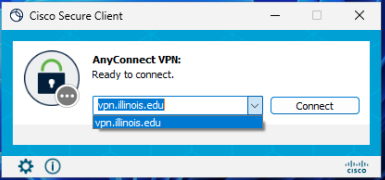
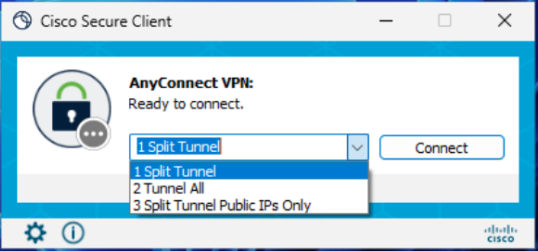
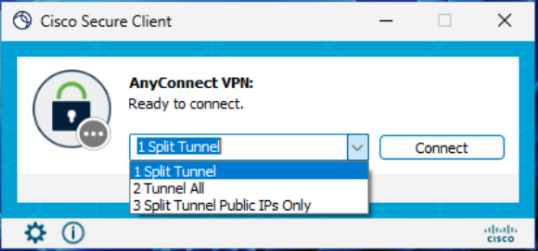
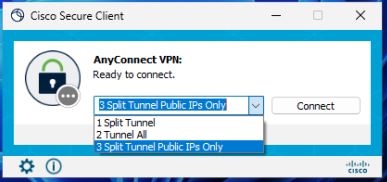
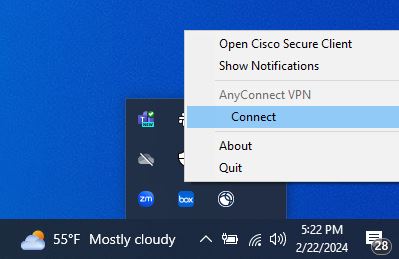
Image of open Cisco Secure Client on Windows device.
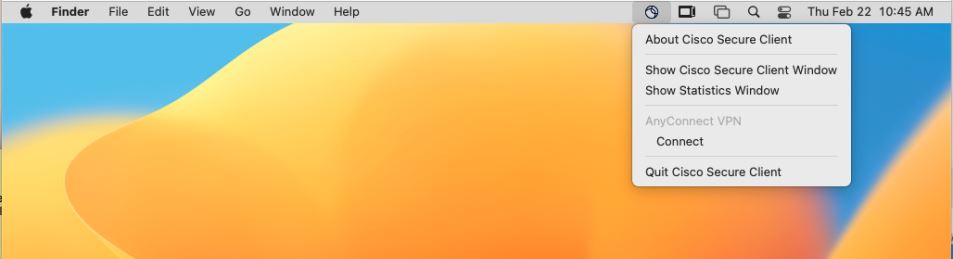
Image of Open Cisco Secure Client on Mac.

1. Open the Cisco Secure Client (formerly AnyConnect) app.

2. Type or select “vpn.illinois.edu” and click “Connect”.

3. Enter your university email, followed by your password.

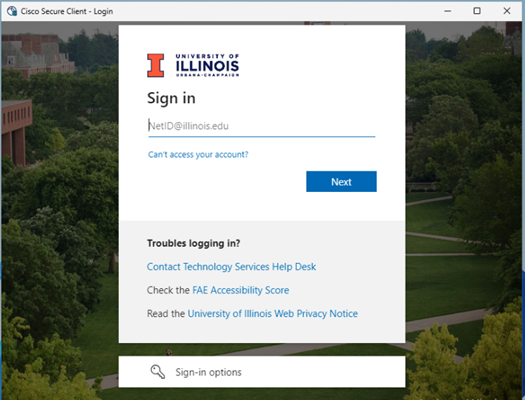
Duo sign in prompt.
This will appear once you click Connect to the campus VPN. Enter your campus NetID here.
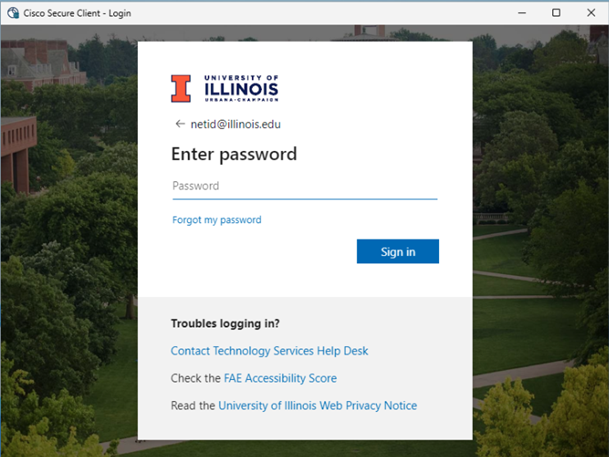
Password prompt for Duo. 
Enter your university password then proceed through the remaining authentication steps.

4. If you are NOT enrolled in Duo, you should connect to the campus VPN at this point.

5. If you use Duo to authenticate for other campus applications, you will be prompted to do so each time you access the campus VPN. Complete Duo authentication as you would with other applications.

6. Once you authenticate with a passcode or push notification, you should be connected to the VPN.


How do I know which VPN option to choose?

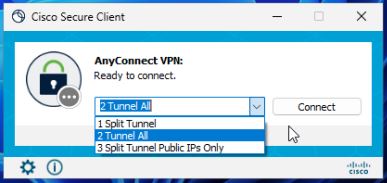
Your goalScreenshotBest VPN option
If your only goal is to access campus resources
1 Split Tunnel
If your goal is to access off-campus resources as if you are on-campus, select the “Tunnel All” profile. This will also allow you to access campus resources. 2 Tunnel All
If your goal is to access campus resources, but you are at a location that uses the same private IP space as Illinois, select the “Split Tunnel Public IPs Only” profile. (If you are not sure what this means, you can safely ignore this profile option.) 3 Split Tunnel Public IPs Only
If you are unsure which profile to choose, select the “Tunnel All” profile. 2 Tunnel All

VPN Login FAQ

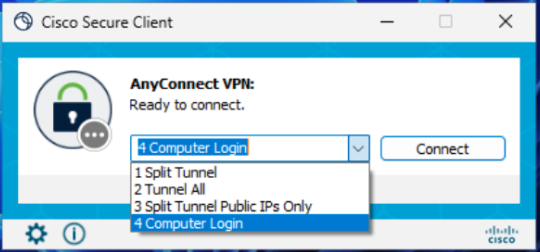
I have FOUR options on my AnyConnect VPN menu.
What is the fourth used for?

4 Computer Login

Computer Login should only be used in situations where you are attempting to connect to the VPN before logging in to your computer.   

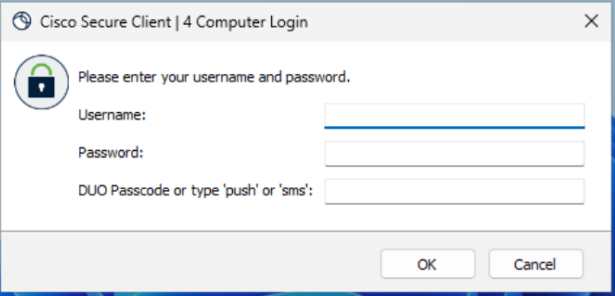
When you try to connect using the “Computer Login” profile, you will see a username prompt, a password prompt, and a Duo passcode prompt.  Enter your NetID as your username and your campus password in the password prompt. In the Duo passcode prompt, enter the word “push”, “sms”, or your Duo one-time passcode.

"Computer Login" prompt option for campus VPN.

I use the OpenConnect Client.
What steps should I follow?

If you are not sure what the OpenConnect client is, you can safely ignore this section. 

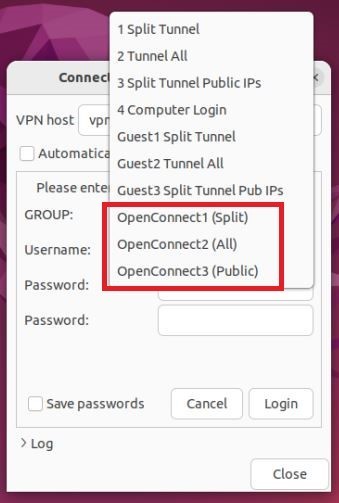
The login process for those who use the OpenConnect client, whether from the command line, a graphical desktop, or through NetworkManager, differs from the Cisco Secure Client process. Beginning on March 12, those who use the OpenConnect client will have to connect to specific VPN profiles that begin with the word “OpenConnect”. 

  • The VPN profile “OpenConnect1 (Split)” is the OpenConnect equivalent of the “Split Tunnel” profile. 
  • The VPN profile “OpenConnect2 (All)” is the equivalent of the “Tunnel All” profile. 
  • The VPN profile “OpenConnect3 (Public)” is the equivalent of the “Split Tunnel Public IPs Only” profile. 

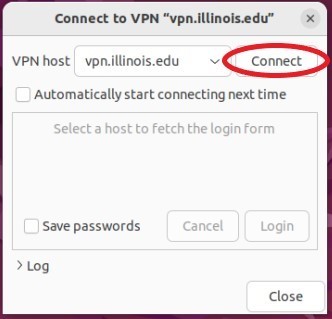
Open Connect with Graphical Interface

If you use OpenConnect through a graphical interface such as Ubuntu Network Manager, connecting to the VPN is a four-step process: 

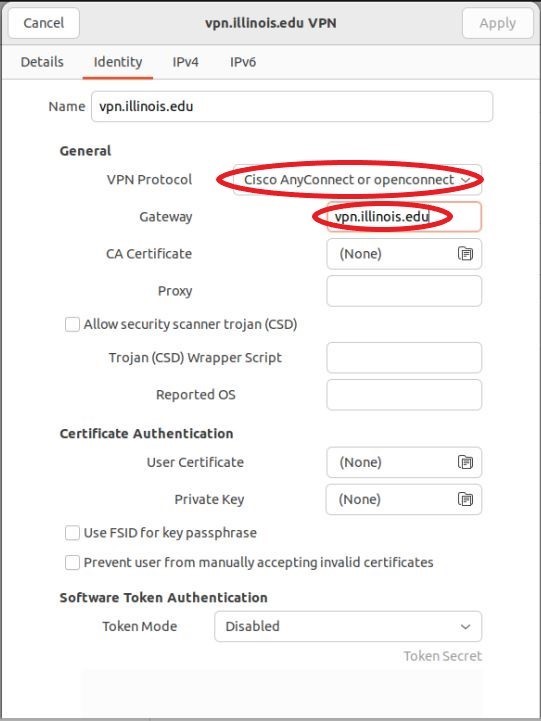
Configure your OpenConnect client to use the following settings then click “Apply”. 

  • VPN Protocol: Select “Cisco AnyConnect or openconnect” 
  • Gateway: vpn.illinois.edu 

From the Network Manager interface, select the VPN you just configured and click “Connect”.

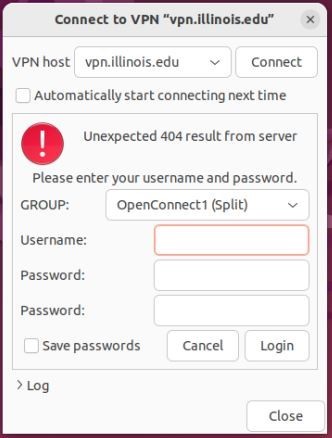
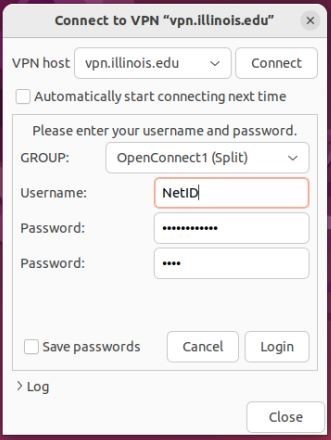
From the “GROUP” drop-down menu, select one of the “OpenConnect” options. 

  • In the “Username” prompt, enter your NetID.
  • In the first password prompt, enter your campus password.   
  • In the second password prompt, enter the word “push”, “sms”, or a Duo one-time passcode.  Then click “Connect”. 

When you connect, you may see an error that says, “Unexpected 404 result from server.”  This error is expected and can be safely ignored. 

OpenConnect with Command-Line Interface

If you use OpenConnect from the command-line interface, connecting to the VPN is a three-step process: 

  1. As the root user, invoke the openconnect command with the “-b” flag and “vpn.illinois.edu” as a positional argument: 

openconnect –useragent=AnyConnect -qb vpn.illinois.edu 

  1. When presented with a “GROUP” list, enter one of the following three options: 
  • “OpenConnect1 (Split)” for Split Tunnel 
  • “OpenConnect2 (All)” for Tunnel All 
  • “OpenConnect3 (Public)” for Split Tunnel Public IPs Only 
  1. You will then be prompted for your username and two passwords.  Use your NetID as your username and your campus password as the first password.  In the second password prompt, enter the word “push”, “sms”, or your Duo one-time passcode. 

When you are done using the VPN, you need to end the OpenConnect client process with a command such as “sudo pkill -SIGINT openconnect”. 

4 Steps to Guard Against Identity Theft 

Tect "Preventing Identity Theft" Image Man running away with a piece of paper

In 2021, roughly 23.9 million people, or 9% of U.S. residents age 16+, reported that they had been victims of identity theft during the prior 12 months in a 2023 U.S. Bureau of Justice Statistics report. 

Identity theft occurs when someone unlawfully uses your personal information to commit fraud. In today’s digital world, steps must be taken to safeguard your information, data, and identity to avoid becoming a victim of such schemes.  

Use this information to help to prevent it:

  • Do not give out any personal information to unfamiliar individuals. Technology Services will never ask for your password, phone number or Social Security number. If someone you don’t know requests information that you may deem unnecessary, you should decline to provide it.  
  • Beware of job and prize scams using spoofed email addresses with offers that seem too good to be true. These scams seek sensitive information such as your password, Social Security Number, and banking details. 
  • Set your social media accounts to private or “friends only” to avoid having your identity stolen on social media sites. Scammers can use your publicly visible data to create fake profiles which impersonate you to connect with targets.
  • Your NetID password should be unique and not a variation of one used for other accounts. You can use the NetID Center to update your University of Illinois NetID password to protect your account from unauthorized access.

The following links provide more information and resources about identity theft from the University of Illinois: 

https://www.ssn.uillinois.edu/identity_theft_information/ 
https://cybersecurity.illinois.edu/manage-and-protect-my-identity/ 

If you find yourself a victim of identity theft, the Federal Trade Commission provides information and resources: 

http://www.ftc.gov/bcp/edu/microsites/idtheft/ 
 

The Department of Justice also provides some helpful information if you suspect you’re a victim of identity theft: 

http://www.usdoj.gov/criminal/fraud/websites/idtheft.html 

Leading with Privacy: Takeaways from Privacy Everywhere 2024 

Technology Services is building a culture of greater awareness and understanding surrounding data privacy at the University. 

Since 2020, Privacy at Illinois has hosted the Privacy Everywhere conference. This year’s conference participants were able to benefit from sessions about privacy engineering, online advertising and privacy, sharing best practices among Big Ten universities, and others.  

Privacy thought leaders shared expertise and experience and fueled thought-provoking conversation. Here’s some of what they covered. 

Your data on the auction block: what it means for you and national security.

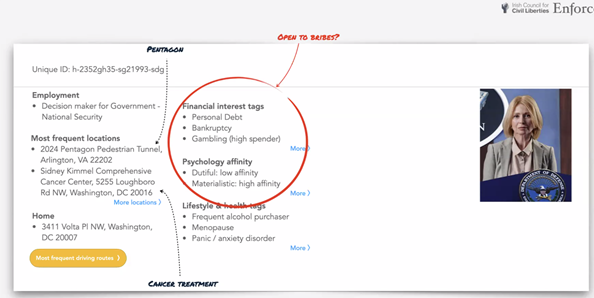
You may have a general idea that your personal data is collected when you interact with a company online. You may even know that your data is frequently sold for marketing and research purposes, but you may not know the extent to which that information about you is being shared and re-shared; sold and resold. Further, you may not understand the breadth of data points available about you.  

Privacy activist Dr. Johnny Ryan is a Senior Fellow at the Irish Council for Civil Liberties and Senior Fellow at the Open Markets Institute. He provided insight into the path your data can take when you use the world’s largest and most popular search engine to make a routine online purchase.  

Ryan showed that some of the data points available in the marketplace through a process called Real Time Bidding have not only personal but national security implications. Information he was able to see—that data brokers can easily obtain—include whether you work for a government agency or for a company that builds systems or products for the government. Data is also available about your financial status—debts, child support owed, etc. A bad actor with both those data sets or other potentially embarrassing or compromising information might have leverage over an individual they wish to blackmail in exchange for sensitive government information. Adding an additional layer of complexity to the already complicated real time bidding process is that many data brokers are individuals or companies based in China or Russia. 

He is presently advocating with the European Union to limit or eliminate the availability of this type of data on the open market.  


AI and large language models are here with privacy implications we should know about. 

Jay Averitt, a Senior Privacy Product Manager at Microsoft, and Saima Fancy, Senior Privacy Specialist at Ontario Health, shared their perspectives about privacy implications in the new world of AI.  

They touched on the speed with which Large Language Models (LLMs) have appeared on the scene. Averitt said that they have just come in a whirlwind and that data privacy is a huge issue with the amount of data going into these models. Fancy posited that LLMs are being released prematurely. “There is a lot of hallucination in the output. In the health sector, people are putting personal information into it not realizing that the data will sit with the LLM and will be used for further LLM training. We have not had time to educate people because they are coming out rapid fire,” she added.  
 
Averitt noted that social media poses an interesting set of issues and there is a tradeoff. “Maybe you don’t have to have absolute privacy because there are some good aspects to social networks. It can be about striking a balance. How much privacy do you want to give up for the product?” he said.  

Fancy echoed those sentiments and added that everyone should recognize that privacy is a fundamental human right you need to protect. “Even if there is some info available about you already, you don’t need to add more. Be your own advocate. Balance your interests with the interests of your family. We don’t have to open our entire book, she explained.” 

Averitt and Fancy also discussed how we must come up with solutions to protect data being shared with LLMs. “Maybe we ensure we are not storing the prompts or training the models? If that model needs that data, we should use anonymized data to train it,” Averitt suggested. 

Fancy pointed to the EU’s General Data Protection Regulation (GDPR) as an example for privacy protection. “GDPR allows individuals to reject being subjected to automatic decision making. North America needs something like GDPR,” she explained.  

Averitt agreed and mentioned that we are playing catch up in the U.S. “I look at whether we are collecting data the right way, storing it the right way. It is about poor data collection in the AI space. It would be great if the AI boom would help get a federal privacy stature in place in the U.S.,” he said.


The more we know about what happens with our data, the more power we can have over it and its use. Here are takeaways you can use to actively engage with data privacy.

  • Personal – Your data is up for auction over and over.  
    Familiarize yourself with how and when your personal data is used by companies and organizations you interact with online. Understand the tradeoffs involved in these interactions. By sharing certain data, you may be giving up some privacy for the sake of convenience.  
  • Professional – AI is here and it is changing at a pace that U.S. privacy regulations have not matched.  
    Baking privacy into AI programs upfront will enable and improve both the AI program and individual’s privacy.  Until then, either avoid adding your personal data into AI systems or make informed decisions about the data you do share. Ensure you have the authority to use AI for sensitive or high-risk data, especially personally identifiable and health information that is not your own. These systems use the data they receive to train on. More dialogue is needed in higher education about best practices with AI and how it can beneficially assist individuals in their learning goals while maintaining privacy principles.  
     
  • Privacy professionals and researchers are your advocates for better transparency and trust.  
    Privacy at Illinois aims to make data privacy top of mind. As software and AI investments come up for purchase and review, the privacy team encourages vendors and developers to take a privacy is baked into the product and process approach. 

    Privacy engineering envisions privacy as a competitive and strategic advantage to drive true innovation in a digital and data driven world. Privacy engineering incorporates technical design and architectural privacy into software development, data projects, and technology. It vastly increases protection of private and personal information – often by not collecting personal details or by highly limiting how sensitive/personal information is collected, processed, stored, and used. 

    Thinking strategically about data management can make data available that previously might not be, but in a principled way. Learn more about privacy policies and practices and how Illinois privacy professionals can help with in your work at Illinois. 

Why Should You Care About Your Personal Data?

Page Metadata

Audience

Difficulty

From 1 to 10, 1 being easiest.
5
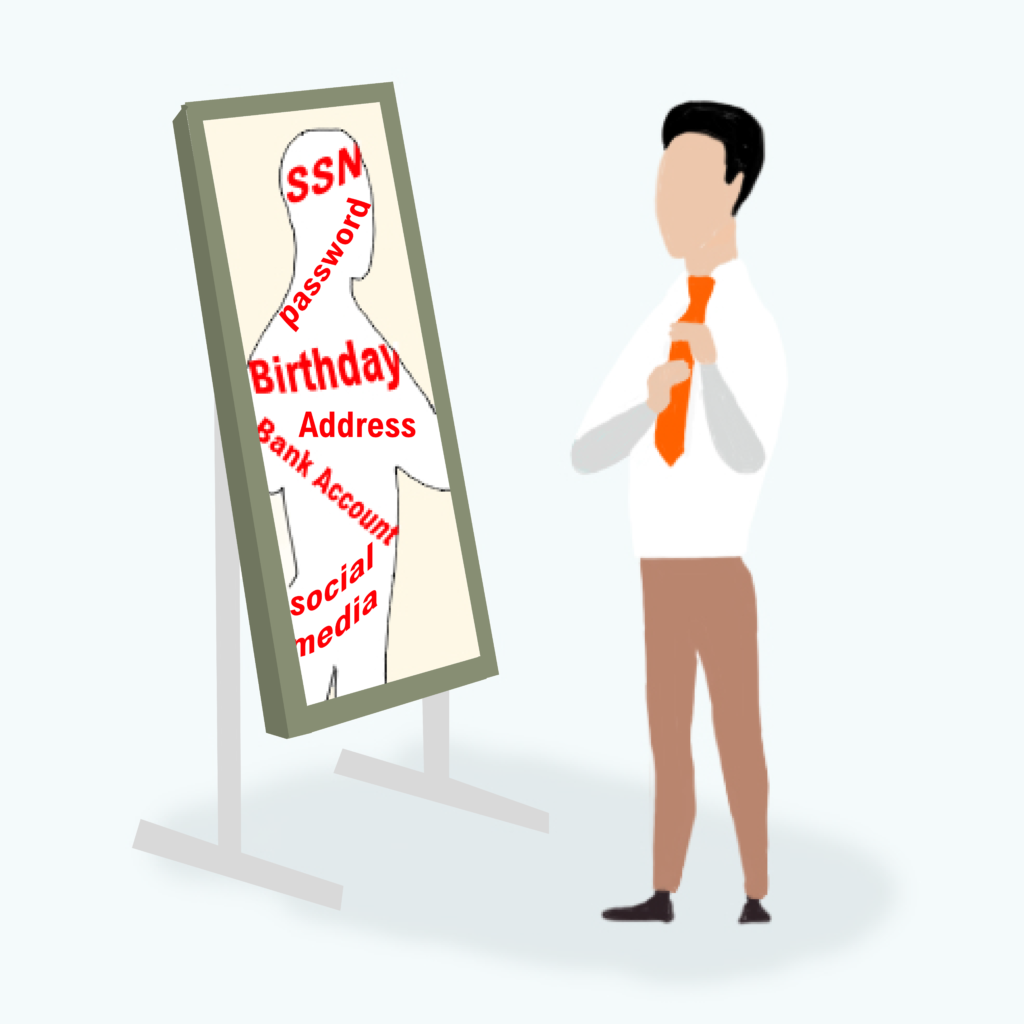
Man in front of a mirror and in his reflection, he sees data points about himself such as passwords, Social Security Number, social media, birthday.

Your data represents you. It is made up of snippets of information about you–everything from your location to your interests to your finances. Ultimately, this data can be aggregated to create a clear picture of your behaviors and beliefs and used in unexpected ways to inform decisions.

The University of Illinois takes steps to protect the data you have shared and created in the course of your time as a student, faculty member, researcher, or employee.

Technology Services is helping to lead University efforts to develop and define privacy policy. A set of privacy pillars guides the work.

  • Trust – Individuals should be able to trust that the university handles their data with the utmost care and protection. 
  • Transparency – Individuals should be notified and understand how the University collects personal data, and for what processing purpose(s) the data is collected. 
  • Consent – Individuals should be able to freely consent or withdraw consent wherever practical, and especially when consent is used as the legal basis for collecting and processing personal data. 

These guidelines also can help you as you consider your data privacy outside the university. Making informed decisions about your data is a key way you can safeguard your privacy, according to Associate Director of Privacy Phil Reiter. He explained that when you interact with an organization or business you can ask yourself some key questions:

Do they provide clear and understandable information about how your data is collected, processed, and shared? For example, do you know what they will do with your data and why they want it in the first place? Are you able to ask that your data be removed or that they stop collecting it if you change your mind about sharing?

According to Reiter, the European Union takes a human-centered approach in this space. As one example, you may have heard about some of the privacy rights available to residents of other countries, such as the right to be forgotten, where you have the right to request your data be deleted, and the law says the organization keeping the data must comply with your request.

“We’re seeing an emergence of comprehensive privacy law here, but often at the state level. The U.S. also focuses on sectoral law, like the health sector or financial sector, rather than comprehensive privacy law. This can lead to complexity and a patchwork that leaves large gaps or fails to mature overall privacy rights,” Reiter said.

What can you do in the meantime? Reiter suggests that while it may seem cumbersome, your privacy is important enough to take time to know what you are agreeing to.

“So much of our lives is conducted online. It’s natural for us to want to use the most convenient app, website, or AI to make our lives easier. Balancing that convenience by being informed about the personal information the app or site collects about you is important. We must play an active and informed role in the data collected about us in order to make decisions in our own interest,” he suggested.

Where can you learn more?

The University has information about privacy that includes a growing privacy guide to university data that provides information about how your data is collected and used. See it here: Privacy Guide to University Data

Privacy issues are complex and affect everyone. To learn more about the wider privacy landscape, Reiter and members of the privacy team suggest the following organizations:

Privacy & Cybersecurity
Digital Computer Lab
1304 W. Springfield Ave.
Urbana, IL 61801
Email: securitysupport@illinois.edu
Log In